

In my last blog post about Hypothesis testing on football players consciously getting yellow cards to be suspended for the next away match, I scraped the website of the German Bundesliga to reach out for the necessary data. This post will describe how we can easily fetch any data from the web and apply it to other use cases.
Thanks to the internet, an almost infinite amount of data is accessible. Every person can click through websites to obtain needed information, but this takes (1) a lot of time and is (2) a tedious and repetitive task, especially when you are interested in more than one piece of information from more than one website. Whenever something is repetitive, it should be possible to automate that task. How can this be applied to websites?
First of all, many websites provide an API, that can be requested to access data directly. Many hosts offer this option and provide an interface for their services. If this is not the case, there are other, more straightforward methods to obtain certain content of websites.
Fetch data
Ultimately, every website consists of html code that is rendered by the browser to show us the content in a friendly, formatted way. Within this html code, the required information is bedded in and needs to be filtered out. So, in the first step, all we need to do is fetch a website and save it as a string. We import “request” and fetch the data using the build-in get() function. Then, we access the website as a string using .text member variable. As an example, I fetch the data of the first German Football League, called Bundesliga:
> import requests
> url = "https://www.dfb.de/bundesliga/"
> html = requests.get(url).text
We received a string that contains the entire website:
> print(html)
<!DOCTYPE html>
<html lang="de">
<head><meta http-equiv="X-UA-Compatible" content="IE=EDGE,chrome=1" /><link rel="stylesheet" type="text/css" href="https://toolbox.dfb.de/latest/design.css" media="all" data-proxy="true">
...
sp_user_id: "", // empty
sp_hash: "sbOICti6a%2BV58qToPehPBSo%3D",
sp_name: "dfb_tsmms_live",
poll_interval: 30000
});
})(jQuery);
</script>
<script type="text/plain" data-usercentrics="Adition" src="/fileadmin/templates/dfb2017/js/adition.js"></script>

</body>
</html>
All we need to do is filter out the information we are interested in.
How to filter the website string
Before we start filtering out the website, we need to know where the information is located on the website. To obverse this, we can use STRG+SHIFT+C in our browser to open the development-view of the browser (which opens on the right-hand side). If we now hover over single elements on the website, we see precisely how it was generated. In the following, I will go through the example from my last blog post, however this is applicable to any website!
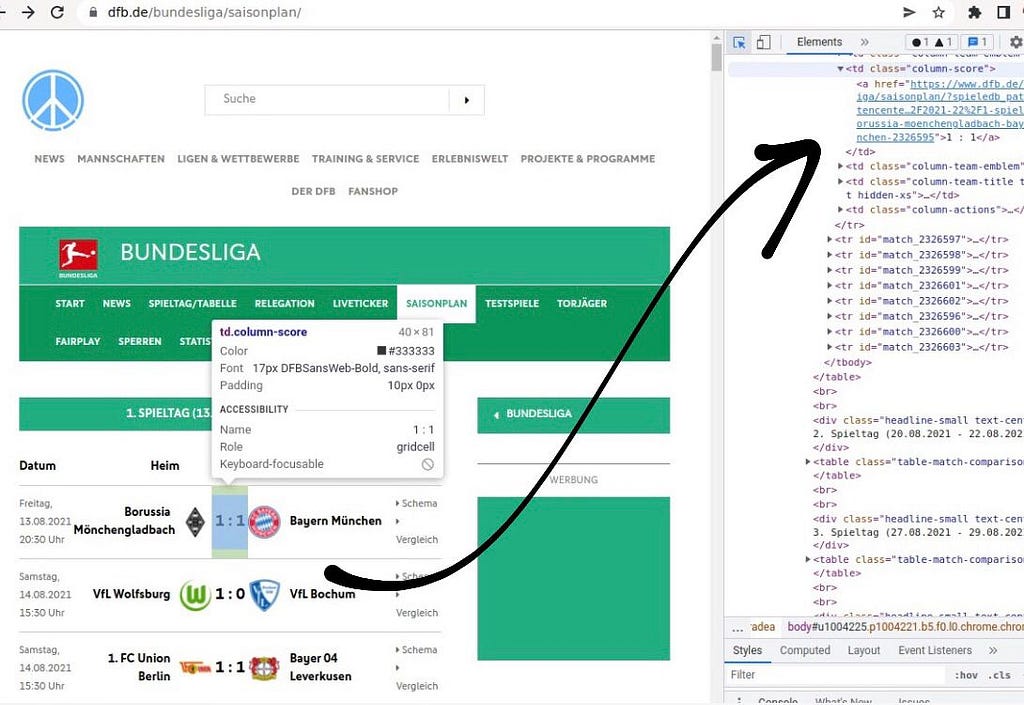
We received a website with a list of of football games, organized in a table. Each row contains information about involved team, date, score and more. Assume we want to access the score of the first game: We recognize that all games are organized in a table whose rows are denoted using the “<tr>” tag of html. We also notice that each row got a match id. The html line we are interested in looks like the following:
<tr id="match_2326595">
...
</tr>
We split the retrieved website string by all rows to access each game to access all games. We receive a list of strings separated by each row. With index “1”, we access the first game:
> row_first_game = html.split('<tr id="match')[1]
> print(row_first_game)
_2326595">
      <td class="column-date">
        Freitag,<br>13.08.2021<br>20:30 Uhr
      </td>

          ...

    </tr>
Each row contains several columns. We access the column where the score is contained by splitting the string by “</td>”, the column tag. Again, we receive a list of strings containing all columns. The desired score is at index position “3”:
> print(row_first_game.split('</td>')[3])
'\n <td class="column-score">\n <a href="https://www.dfb.de/bundesliga/saisonplan/?spieledb_path=%2Fdatencenter%2Fbundesliga%2F2021-22%2F1-spieltag%2Fborussia-moenchengladbach-bayern-muenchen-2326595">1 : 1 </a>\n '
We apply the .split() function another time until we scraped out the information we are interested in. Of course, there are many other ways to do this. Using the .split() function of string is just one option, however it turns out to be very useful. For example, you can also check if a certain string is contained in the website using .split(), since you get back a list of strings. If this is list is not greater than 1, then the initial string does not contain the keyword:
> if len(row_first_game.split("bayern-muenchen")) > 1:
Here, we check if FC Bayern München was involved in the game!
Building a pipeline to automatize
Usually, you do not need only one piece of information but many; otherwise, you must not apply a script. You check the data and write it down. To do this, you have to dig a little into the concept/construction of the website. As I mentioned earlier, the website of the results of the German Bundesliga is arranged as a table. Having this established, it is effortless to loop over all rows, aka all games, and access the information there. We wanted to obtain more details on the single games, so we have to extract the link to each new game. Here is a code example:
> for game in html.split('<tr id="match')[1:]:
>    column = game.split('</td>')[3]
>    link_to_each_game = column.split('href="')[1].split('">')[0]
>    print(link_to_each_game, "\n")
https://www.dfb.de/bundesliga/saisonplan/?spieledb_path=%2Fdatencenter%2Fbundesliga%2F2021-22%2F1-spieltag%2Fborussia-moenchengladbach-bayern-muenchen-2326595

https://www.dfb.de/bundesliga/saisonplan/?spieledb_path=%2Fdatencenter%2Fbundesliga%2F2021-22%2F1-spieltag%2Fvfl-wolfsburg-vfl-bochum-2326597

https://www.dfb.de/bundesliga/saisonplan/?spieledb_path=%2Fdatencenter%2Fbundesliga%2F2021-22%2F1-spieltag%2F1-fc-union-berlin-bayer-04-leverkusen-2326598
...
Now, we can access each link of each game in one season. In the next step, we download the website for each game using the link to access the data (in the example of the last article: players that received a yellow card).
> for game in html.split('<tr id="match')[1:]:
>    column = game.split('</td>')[3]
>    link_to_each_game = column.split('href="')[1].split('">')[0]
>    details = requests.get(link_to_each_game).text
>    # parsing 'details' and storing data ...
The data has to be stored somewhere within the for-loops, but this is not the subject of this article.
To build up the whole pipeline for all seasons, we also have to loop over all seasons. Luckily, the links for each season were constructed as https://www.dfb.de/datencenter/bundesliga/”SEASON”, so we could build the link for each season easily:
> for season in ["2021-22", "2020-21", "2019-20"]:
>    url = "https://www.dfb.de/datencenter/bundesliga/"+season
>    html = requests.get(url).text
>    for game in html.split('<tr id="match')[1:]:
>       column = game.split('</td>')[3]
>       link_to_each_game = column.split('href="')[1].split('">')[0]
>       details = requests.get(link_to_each_game).text
>       # parsing 'details' and storing data ...
Most websites can be screened in an automated fashion because they are usually generated in an automated fashion using modern web development. Therefore, structures are there; they only have to be discovered and used.
Monitoring, testing, and other use cases
Once you set up your pipeline, it is essential to test your data since you can not rely on all subpages having the same structure. The easiest way to quickly test your results is to collect some of the data manually and compare it with the data collected by your pipeline. Also, tests for consistency have to be considered. Ask yourself if it makes sense what you got and if the received data types match with the targeted data types in all columns.
If you run your script regularly, which can make sense if your data changes regularly, i.e., to track all new games in the Bundesliga, there are interesting options. Under Linux, you can use cronjobs, which enables you to run scripts minutely, hourly, daily, or whatever you desire. If you do so, you should use Software to monitor if your pipeline is running correctly regularly. One way to do this is to use another cronjob, or an open-source tool like Nagios.
One last word why I am not using existing Python libraries Beautiful Soup, Selenium, or Scrapy as described in this article. Essentially, they are doing the same things but hidden behind functions and interfaces, but you understand less how the Website is structured.
All in all, fetching data online is surprisingly easy and can bring many benefits. It also helps to understand web applications and the structures of websites. I will write about another application in a future article where I used scraping websites. Thanks for reading, and let me know if you have any comments or improvements; I am open to any advice!